راهنمای تصویری افزودن URL rewrite در web.config
جهت استفاده از url rewrite در IIS می توانید موارد زیر را درفایل web.config اضافه نمایید ، همچنین روند افزودن آن نیز در IIS بصورت زیر خواهد بود:
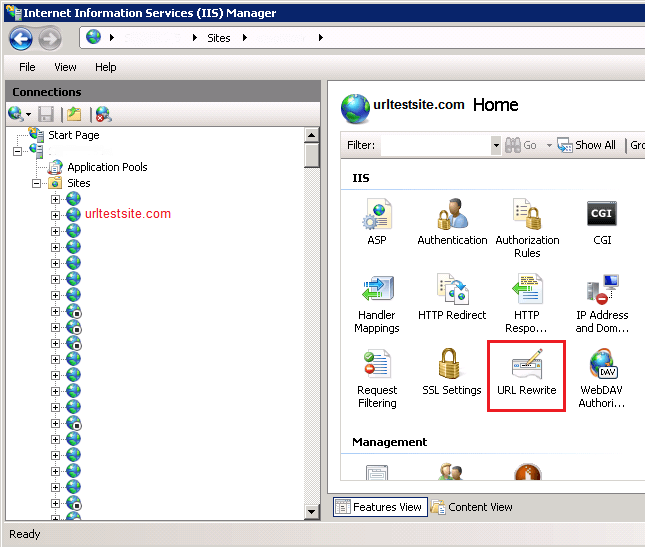
- در IIS روی سایت مورد نظر کلیک نمایید و سپس در سمت راست صفحه ، گزینه URL rewrite را انتخاب نمایید:
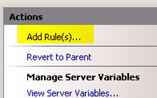
- در این صفحه گزینه Add Rules را انتخاب نمایید:
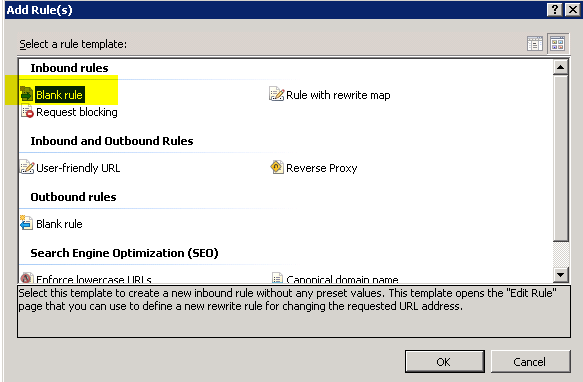
- سپس گزینه Blank Rule را کلیک نمایید:
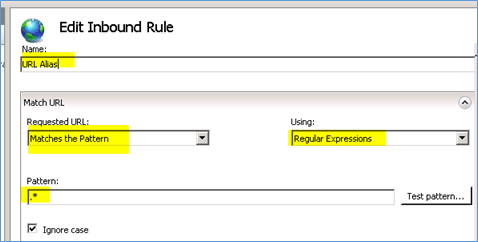
- در صفحه تنظیمات Inbound Rule یک نام برای Rule خود انتخاب نموده و در قسمت Name وارد نمایید.
- اطمینان حاصل فرمایید گزینههای Matches the pattern و Regular Expressions انتخاب شده باشند.
- در قسمت Pattern نیز از مقدار .* استفاده نمایید:
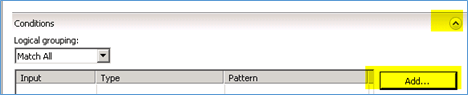
- در قسمت Conditions گزینه Add را کلیک نمایید:
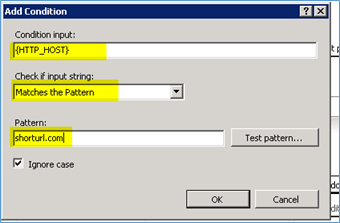
- در این صفحه، مقدار Condition input را {HTTP_HOST} قرار داده و برای قسمت check if input string نیز Matches the pattern را انتخاب نمایید. سپس در قسمت Pattern آدرس دوم مورد نظر خود را وارد نمایید:
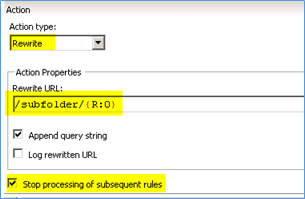
- سپس به قسمت Action بروید و نوع Action را Rewrite انتخاب نموده و آدرسی که میخواهید به آن اشاره شود را بصورت subfolder وارد نمایید: به عنوان مثال در صورتی که بخواهید به آدرس C:\inetpub\vhosts\radcomhost.test\httpdocs\support اشاره نماید ، فقط آدرس /support/{R:0} را وارد نموده ، سپس گزینه های append query string , stop processing را فعال نمایید :
- گزینه Apply را در قسمت سمت راست Action pane کلیک نموده و Rule مورد نظر در فایل web.config اضافه خواهد شد:
<rewrite>
<rules>
<rule name="URL Alias" stopProcessing="true">
<match url=".*" />
<conditions>
<add input="{HTTP_HOST}" pattern="shorturl.com" />
</conditions>
<action type="Rewrite" url="/support/{R:0}" />
</rule>
</rewrite>