ایمن سازی برنامه ها با استفاده از احراز هویت بر مبنای توکن - بخش دهم - نحوه ورود به سیستم احراز هویت بیرونی

ما سرویس توکن را برای استفاده از گوگل به عنوان سیستم احراز هویت بیرونی تنظیم کرده ایم. قبل از اینکه برنامه را آزمایش کنیم، بیایید کنترلر Account را که در پوشه QuickStart قرار دارد، بررسی کنیم و ببینیم چه بخش های دیگری وجود دارند. متد یا همان اکشن login نقطه شروع فرایند برای این احراز هویت است.
نحوه ورود به سیستم احراز هویت بیرونی
ما سرویس توکن را برای استفاده از گوگل به عنوان سیستم احراز هویت بیرونی تنظیم کرده ایم. قبل
از اینکه برنامه را آزمایش کنیم، بیایید کنترلر Account را که در پوشه
QuickStart قرار دارد، بررسی کنیم و ببینیم چه بخش های دیگری وجود دارند.
متد یا همان اکشن login نقطه شروع فرایند برای این احراز هویت است.
متد بعدی که از اهمیت برخودرار است، متد CallBack است.
در ابتدا، متد، هویتی (Identity) که از طرف ارائه دهنده احراز هویت خارجی برگشت داده شده است و در یک کوکی موقت نگهداری می شود را بررسی می کند.
حال می توانیم claim های کاربر را دریافت کنیم و تصمیم بگیریم که چگونه با کاربر تعامل کنیم، اینکه کاربر جدید است و یا کاربری است که از سمت ارائه دهنده احراز هویت برگشت داده شده است.
توجه داشته باشید که کاربر با فراخوانی متد SignInAsync به برنامه وارد شده و کوکی تایید اعتبار صادر می گردد. در مرحله بعد، کوکی ایجاد شده به صورت موقت حذف گردیده و کاربر به یک صفحه محلی هدایت می شود.
حال که بررسی کردیم که چگونه ورود توسط تامین کننده احراز هویت بیرونی کار می کند، پروژه TokenService و Webclient را اجرا می کنیم.
روی منوی student portal کلیک می کنیم، از آنجا که ما تایید اعتبار نشده ایم، به صورت خودکار به صفحه ورود Identity server هدایت می شویم.
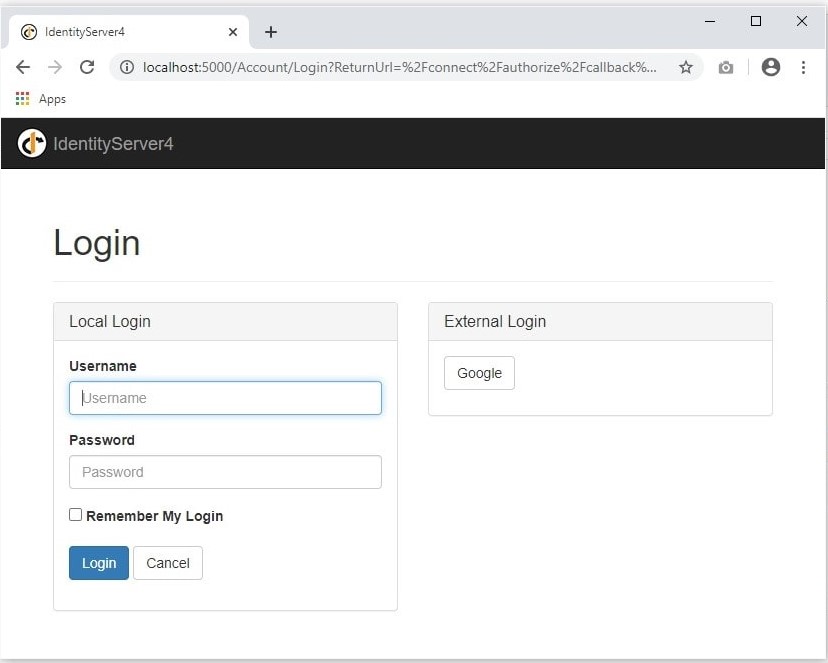
همانطور که مشاهده می کنید، در صفحه ورود، بخشی برای ورود با سیستم احراز هویت خارجی و به طور مشخص google نمایش داده می شود، با کلیک بر روی کلید Google وارد چرخه احراز هویت خارجی شده و به صفحه لاگین گوگل هدایت می شویم.
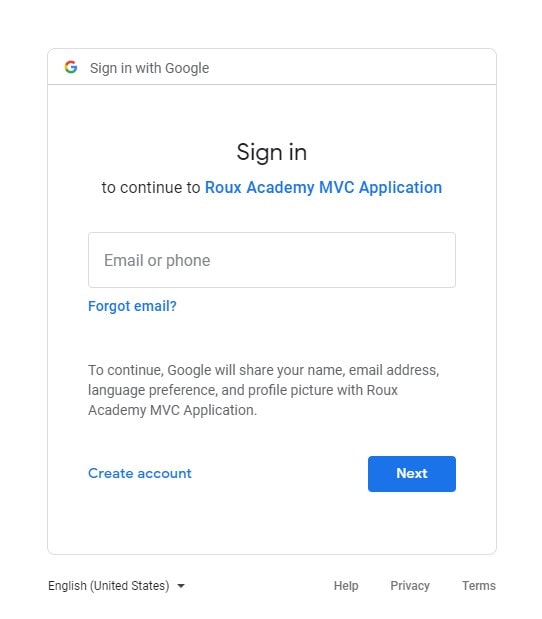
ادامه می دهیم و اطلاعات ورود به حساب کاربری گوکل را وارد می کنیم. پس از تایید هویت، به صفحه توافق سرویس هدایت می شویم.
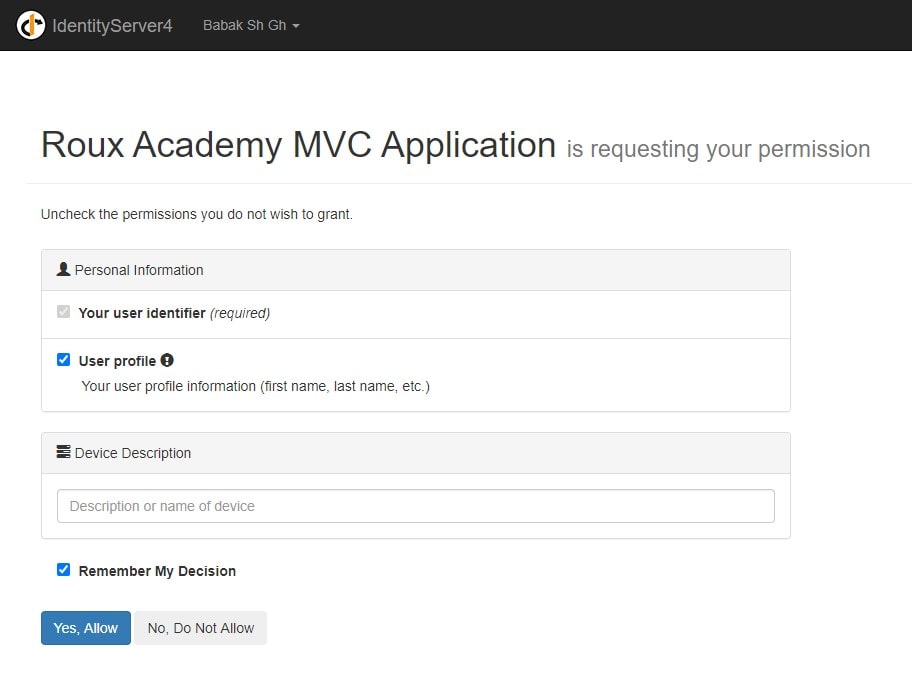
من به وب سایت Roux Academy اجازه می دهم تا به اطلاعات پروفایلم دسترسی داشته باشد. حال شما می توانید اطلاعات مربوط به Claim های کاربر (خودتان) و اطلاعاتی نظیر نام و نام خانوادگی خود را در صفحه اصلی مربوط به دانش آموزان مشاهده فرمایید. این بخشی از اطلاعات توکن احراز هویت است که از طرف گوگل ارسال می شود. حال ما دیدیم که چگونه می توانیم کاربران را با ارائه دهنده تایید هویت خارجی تایید اعتبار کنیم و به اطلاعات هویتی کاربر در برنامه خود دسترسی داشته باشیم.
در صورتی که از احراز هویت خارجی استفاده می کنیم به سمت کنترلر External و متد Challenge هدایت می شویم. به سراغ متد Challenge می رویم، در این متد به بخش زیر می رسیم:/// <summary> /// Entry point into the login workflow /// </summary> [HttpGet] public async Task<IActionResult> Login(string returnUrl){// build a model so we know what to show on the login page var vm = await BuildLoginViewModelAsync(returnUrl); if (vm.IsExternalLoginOnly){// we only have one option for logging in and it's an external provider return RedirectToAction("Challenge", "External", new { provider = vm.ExternalLoginScheme, returnUrl });}return View(vm);}
 // start challenge and roundtrip the return URL and scheme
var props = new AuthenticationProperties
{
	RedirectUri = Url.Action(nameof(Callback)),
	Items =
	{
		{ "returnUrl", returnUrl },
		{ "scheme", scheme },
	}
};

return Challenge(props, scheme);
متد بعدی که از اهمیت برخودرار است، متد CallBack است.
/// <summary>
/// Post processing of external authentication
/// </summary>
[HttpGet]
public async Task<IActionResult> Callback()
{
	// read external identity from the temporary cookie
	var result = await HttpContext.AuthenticateAsync(IdentityServer4.IdentityServerConstants.ExternalCookieAuthenticationScheme);
	if (result?.Succeeded != true)
	{
		throw new Exception("External authentication error");
	}

	if (_logger.IsEnabled(LogLevel.Debug))
	{
		var externalClaims = result.Principal.Claims.Select(c => $"{c.Type}: {c.Value}");
		_logger.LogDebug("External claims: {@claims}", externalClaims);
	}

	// lookup our user and external provider info
	var (user, provider, providerUserId, claims) = FindUserFromExternalProvider(result);
	if (user == null)
	{
		// this might be where you might initiate a custom workflow for user registration
		// in this sample we don't show how that would be done, as our sample implementation
		// simply auto-provisions new external user
		user = AutoProvisionUser(provider, providerUserId, claims);
	}

	// this allows us to collect any additional claims or properties
	// for the specific protocols used and store them in the local auth cookie.
	// this is typically used to store data needed for signout from those protocols.
	var additionalLocalClaims = new List<Claim>();
	var localSignInProps = new AuthenticationProperties();
	ProcessLoginCallbackForOidc(result, additionalLocalClaims, localSignInProps);
	//ProcessLoginCallbackForWsFed(result, additionalLocalClaims, localSignInProps);
	//ProcessLoginCallbackForSaml2p(result, additionalLocalClaims, localSignInProps);

	// issue authentication cookie for user
	var isuser = new IdentityServerUser(user.SubjectId)
	{
		DisplayName = user.Username,
		IdentityProvider = provider,
		AdditionalClaims = additionalLocalClaims
	};

	await HttpContext.SignInAsync(isuser, localSignInProps);

	// delete temporary cookie used during external authentication
	await HttpContext.SignOutAsync(IdentityServer4.IdentityServerConstants.ExternalCookieAuthenticationScheme);

	// retrieve return URL
	var returnUrl = result.Properties.Items["returnUrl"] ?? "~/";

	// check if external login is in the context of an OIDC request
	var context = await _interaction.GetAuthorizationContextAsync(returnUrl);
	await _events.RaiseAsync(new UserLoginSuccessEvent(provider, providerUserId, user.SubjectId, user.Username, true, context?.ClientId));

	if (context != null)
	{
		if (context.IsNativeClient())
		{
			// The client is native, so this change in how to
			// return the response is for better UX for the end user.
			return this.LoadingPage("Redirect", returnUrl);
		}
	}

	return Redirect(returnUrl);
}
در ابتدا، متد، هویتی (Identity) که از طرف ارائه دهنده احراز هویت خارجی برگشت داده شده است و در یک کوکی موقت نگهداری می شود را بررسی می کند.
حال می توانیم claim های کاربر را دریافت کنیم و تصمیم بگیریم که چگونه با کاربر تعامل کنیم، اینکه کاربر جدید است و یا کاربری است که از سمت ارائه دهنده احراز هویت برگشت داده شده است.
توجه داشته باشید که کاربر با فراخوانی متد SignInAsync به برنامه وارد شده و کوکی تایید اعتبار صادر می گردد. در مرحله بعد، کوکی ایجاد شده به صورت موقت حذف گردیده و کاربر به یک صفحه محلی هدایت می شود.
حال که بررسی کردیم که چگونه ورود توسط تامین کننده احراز هویت بیرونی کار می کند، پروژه TokenService و Webclient را اجرا می کنیم.
روی منوی student portal کلیک می کنیم، از آنجا که ما تایید اعتبار نشده ایم، به صورت خودکار به صفحه ورود Identity server هدایت می شویم.
همانطور که مشاهده می کنید، در صفحه ورود، بخشی برای ورود با سیستم احراز هویت خارجی و به طور مشخص google نمایش داده می شود، با کلیک بر روی کلید Google وارد چرخه احراز هویت خارجی شده و به صفحه لاگین گوگل هدایت می شویم.
ادامه می دهیم و اطلاعات ورود به حساب کاربری گوکل را وارد می کنیم. پس از تایید هویت، به صفحه توافق سرویس هدایت می شویم.
من به وب سایت Roux Academy اجازه می دهم تا به اطلاعات پروفایلم دسترسی داشته باشد. حال شما می توانید اطلاعات مربوط به Claim های کاربر (خودتان) و اطلاعاتی نظیر نام و نام خانوادگی خود را در صفحه اصلی مربوط به دانش آموزان مشاهده فرمایید. این بخشی از اطلاعات توکن احراز هویت است که از طرف گوگل ارسال می شود. حال ما دیدیم که چگونه می توانیم کاربران را با ارائه دهنده تایید هویت خارجی تایید اعتبار کنیم و به اطلاعات هویتی کاربر در برنامه خود دسترسی داشته باشیم.